
Scope guide · History & 3D
3D Waveform
Read picture position and component level across a rolling 15-second history.
ProfessionalLearn & Reference / Scope library / 3D Waveform
Did the level change while I watched something else?
Add this view from Add scope > 3D Waveform, then choose the input you want to inspect. Use the pane's i button for its in-app reading guide.
Read this example.
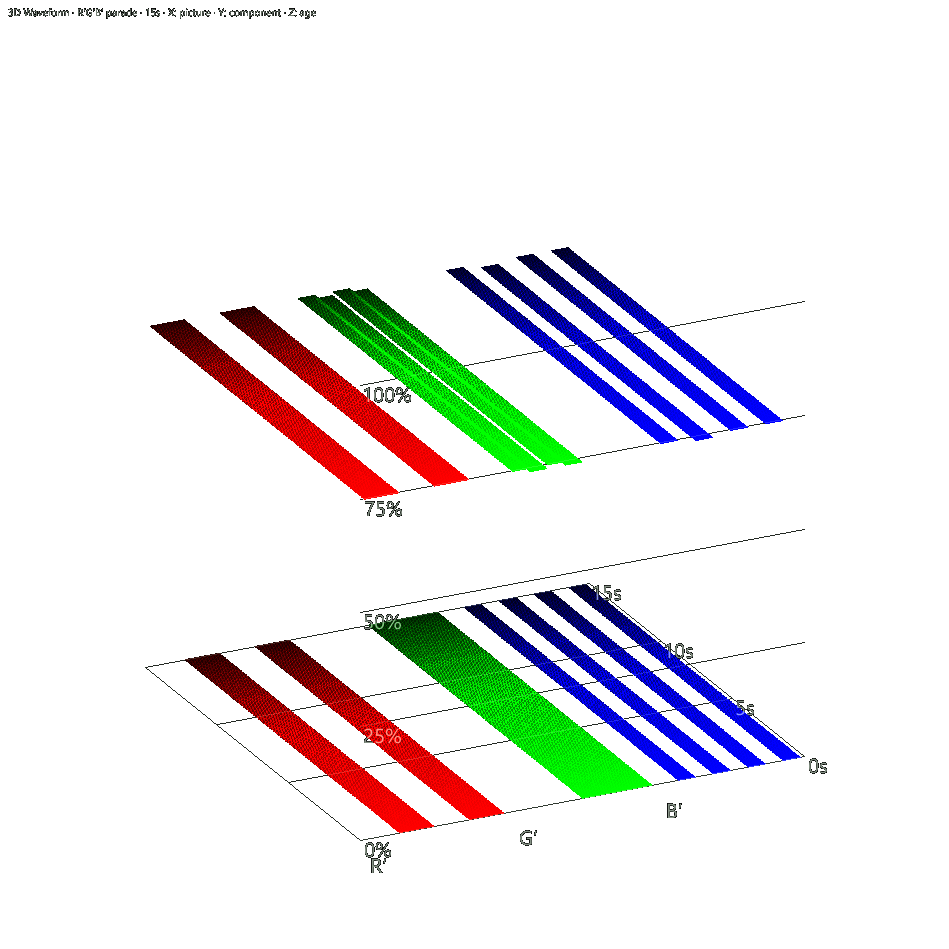
- Each component retains horizontal picture position and vertical signal level.
- Upper and lower plateau groups show levels in the generated fixture.
- Age labels distinguish current and older distributions. Rotate to follow the depth axis.
Try it yourself.
- Open from Add scope or the Waveform cube icon.
- Choose Y′ or a fixed-color parade, then compare Overlay with Tiled.
- Watch a moving source or change a generated pattern, then Freeze.
Useful controls.
- Shares the ordered Waveform component catalog and edition rules.
- Each layer uses 192 horizontal by 128 level bins per component.
- Drag rotates, wheel zooms, double-click resets. Clear history or source/component changes start fresh.
Adaptive sampling builds up to ten distributions per second. Ordinary Waveform offers current-frame inspection at full input resolution.