
Scope guide · Production tools
Ancillary Data
Inspect metadata and browse a rolling minute of snapshots while capture continues.
ProfessionalLearn & Reference / Scope library / Ancillary Data
What metadata changed beside the picture?
Add this view from Add scope > Ancillary Data, then choose the input you want to inspect. Use the pane's i button for its in-app reading guide.
Read this example.
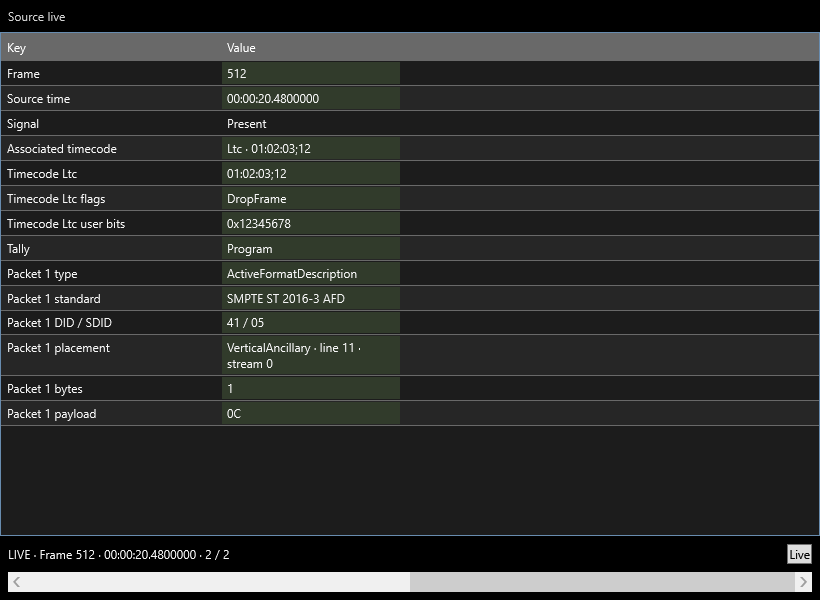
- Keys and values describe the selected frame; highlighted values indicate changes.
- Timecode supplies timing evidence. Packet fields identify standard, DID/SDID, placement, bytes and payload.
- Browse snapshots or double-click a field to follow a single key.
Try it yourself.
- Choose an input supplying metadata.
- Browse retained snapshots while capture continues.
- Double-click a changing field, then return to All keys or Live.
Useful controls.
- Live follows the latest snapshot.
- Key history focuses on a single metadata field.
- Packet and timecode availability follow the adapter and incoming signal.
This screenshot uses deterministic test metadata. On a real input, read the fields supplied by that signal.