
Scope guide · Production tools
Shot Evaluator
Bring descriptive exposure, color, focus, lighting, framing, motion and audio evidence beside Picture, with cards that help direct the next check.
ProfessionalLearn & Reference / Scope library / Shot Evaluator
What should I inspect first in this shot?
Add this view from Add scope > Shot Evaluator, then choose the input you want to inspect. Use the pane's i button for its in-app reading guide.
Read this example.
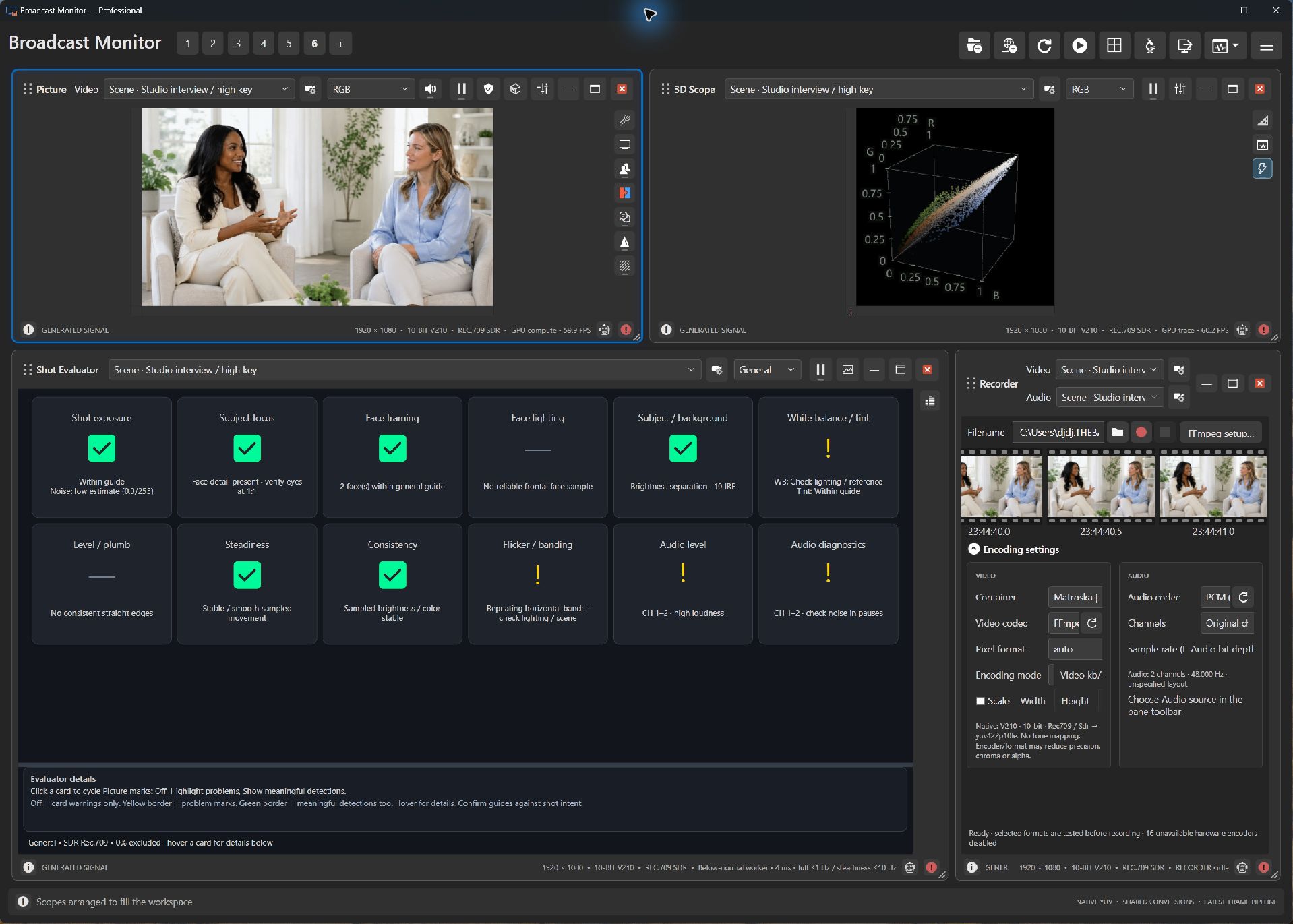
- Cards organize evidence into practical questions. Read the description alongside the status icon.
- The two people and bright clothing provide exposure, face and framing subjects. Compare suggestions with Picture.
- Use a moving camera for temporal questions, and evaluate audio against its independently selected source.
Try it yourself.
- Open a studio-pair/interview sample beside Picture.
- Hover a card for its guide. Click a video card through Off, Highlight problems and Show meaningful detections.
- Follow marks in Picture and inspect the relevant scope before deciding on an adjustment.
Useful controls.
- Yellow state adds supported problem marks; green also adds supported detection evidence.
- Drag the divider to resize or hide the information pane.
- Compatible camera controls can attach beside scopes. Ask AI provides separately configured review of chosen images and context.
Cards guide inspection and production judgment. Source, LUT and analysis-area changes refresh evidence for the new context.